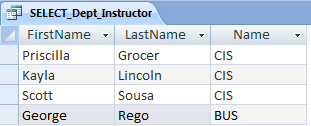
Find instructors who are also students (based on student's college ID that
also happens to be one of the instructors' IDs).
-
SELECT
    Instructor.*
FROM
    Instructor, Student
WHERE
    Instructor.CollegeID = Student.CollegeID
-
Caution!
-
If you add fields from two or more tables and don't join the tables by a
WHERE clause (or a JOIN statement explained later),
    WHERE
        Table1.Field1 = Table2.Field2
then your SELECT statement will
return a combination of all rows of all tables, called a
Cartesian product. Executing such a statement against tables on a
remote machine can generate enough traffic to bring a network down to its knees.
Many databases use a default maximum of 10,000 rows to prevent an
accidental Cartesian product from consuming all database server resources
for a substantial period of time.
-
Find students who withdrew from classes.
SELECT
    Student.*,
    Course.*
FROM
    Student, Enrollment, Section, Course
WHERE
    Student.ID = Enrollment.StudentID
AND Enrollment.SectionID = Section.ID
AND Section.CourseID = Course.ID
AND Enrollment.FinalGrade = 'W'
-
Find courses that are offered only on-line.
SELECT
    Course.*,
    Section.Name,
    Section.Room
FROM
    Course, Section
WHERE
    Course.ID = Section.CourseID
AND Section.Room = 'Online'
-
Find courses that are offered either on-line or hybrid.
SELECT
    Course.*,
    Section.Name,
    Section.Room
FROM
    Course, Section
WHERE
    Course.ID = Section.CourseID
AND Course.Type IN ( 'Online', 'Hybrid' )
-
Find grades for a particular student.
SELECT
    Student.FirstName,
    Student.LastName,
    Student.CollegeID,
    Enrollment.AcademicYear,
    Enrollment.Term,
    Enrollment.MidtermGrade,
    Enrollment.FinalGrade,
    Course.Name,
    Course.Description
FROM
    Student, Enrollment, Section, Course
WHERE
    Student.ID = Enrollment.StudentID
AND Enrollment.SectionID = Section.ID
AND Section.CourseID = Course.ID
AND Student.CollegeID = '9001317'
-
Print grades for all students in a particular course.
SELECT
    Student.FirstName,
    Student.LastName,
    Student.CollegeID,
    Enrollment.AcademicYear,
    Enrollment.Term,
    Enrollment.MidtermGrade,
    Enrollment.FinalGrade,
    Course.Name,
    Course.Description
FROM
    Student, Enrollment, Section, Course
WHERE
    Student.ID = Enrollment.StudentID
AND Enrollment.SectionID = Section.ID
AND Section.CourseID = Course.ID
AND Course.Name = 'CIT122'
-
Find classrooms occupied during particular time interval in the schedule.
The Section table contains the Room column.
The following query should print all rooms and their use by a
particular part of the schedule (in this example, Monday, 9:00 AM - 2:00 PM):
SELECT
    Section.Room,
    Schedule.StartTime,
    Schedule.EndTime
FROM
    Section, Schedule
WHERE
    Section.ScheduleID = Schedule.ID
AND Section.Room <> 'Online'
AND #09:00 AM# <= Schedule.StartTime
AND Schedule.EndTime <= #02:00 PM#
AND Schedule.Day = 'M'
Note that I am excluding anything that is taught 'online'
to limit the output to physical rooms only. Same results can be obtained using
BETWEEN selection:
SELECT
    Section.Room,
    Schedule.StartTime,
    Schedule.EndTime
FROM
    Section, Schedule
WHERE
    Section.ScheduleID = Schedule.ID
AND Section.Room <> 'Online'
AND Schedule.StartTime BETWEEN #09:00 AM# AND #02:00 PM#
AND Schedule.Day = 'M'
-
Print schedule of courses, sections, instructors, time, and
rooms where the courses are taught.
SELECT
    Course.Name,
    Section.Name,
    Section.Room,
    Schedule.Day,
    Schedule.StartTime,
    Schedule.EndTime,
    Instructor.FirstName,
    Instructor.LastName
FROM
    Course, Section, Schedule, Instructor
WHERE
    Course.ID = Section.CourseID
AND Section.ScheduleID = Schedule.ID
AND Section.InstructorID = Instructor.ID
-
Find students with absences (use less than 10 hours attendance criteria
to determine the absence.)
This query is using the Attendance table added in
Selecting Data from the Database
handout (look for CREATE_TABLE_Attendance.)
SELECT
    Student.FirstName,
    Student.LastName,
    Student.CollegeID,
    Attendance.SectionID,
    Attendance.Hours
FROM
    Attendance, Student
WHERE
    Attendance.StudentID = Student.ID
AND Attendance.SectionID
AND Attendance.Hours < 10
-
Find students registered for courses.
SELECT
    Student.FirstName,
    Student.LastName,
    Student.CollegeID,
    Enrollment.SectionID
FROM
    Enrollment, Student
WHERE
    Enrollment.StudentID = Student.ID
AND Enrollment.AcademicYear = 2012
AND Enrollment.Term = 'Spring'
-
Print course/section names for sections with unassigned instructors.
SELECT
    Course.Name,
    Section.Name
FROM
    Course, Section
WHERE
    Course.ID = Section.CourseID
AND Section.InstructorID IS NULL
-
Find all sections for a particular course.
SELECT
    Course.Name,
    Section.Name
FROM
    Course, Section
WHERE
    Course.ID = Section.CourseID
AND Course.Name = 'CIT122'
-
Find instructors with duplicate college IDs.
SELECT
    i1.*
FROM
    Instructor i1, Instructor i2
WHERE
    i1.CollegeID <> i2.CollegeID
AND i1.FirstName = i2.FirstName
AND i1.LastName = i2.LastName
This SQL statement forms a self-join.
-
Self-joins relate values in a single table. Creating a self-join requires that
you add a copy of the table to the query and then add a join between the
related fields.
The query to display instructors with duplicate college IDs
is an example of a self-join.
-
To specify a self-join, the Instructor table was included
twice in the list of tables:
FROM
    Instructor i1, Instructor i2
Here, i1 and i2 are known as alias table names.
The two alias are distinguished by the condition
WHERE
    i1.CollegeID <> i2.CollegeID
This comparison uses not equal operator <>,
which separates the Instructor table into two copies.
The copies are joined (compared to each other) in the following manner:
-
The values are selected twice from the same table, the same column.
-
The comparison i1.CollegeID<>i2.CollegeID eliminates
cases where a particular value would be equal to itself.
-
Finally, the first and last name columns are compared. If they are
equal, we found two distinct rows in the Instructor table with
duplicate college IDs.
-
Similarly,
-
Find students with duplicate college IDs.
SELECT
    s1.*
FROM
    Student s1, Student s2
WHERE
    s1.CollegeID <> s2.CollegeID
AND s1.FirstName = s2.FirstName
AND s1.LastName = s2.LastName
-
Find sections of the same course that run at the same time.
SELECT
    Course.Name,
    s1.Name,
    s1.Room,
    s2.Name,
    s2.Room,
    Sch1.Day,
    Sch1.StartTime,
    Sch1.EndTime
FROM
    Course, Section s1, Section s2, Schedule Sch1, Schedule Sch2
WHERE
    s1.ID <> s2.ID
AND Sch1.ID = Sch2.ID
AND Course.ID = s1.CourseID
AND Course.ID = s2.CourseID
AND s1.ScheduleID = Sch1.ID
AND s2.ScheduleID = Sch2.ID
-
Subquery is an additional SQL method for handling data across multiple tables.
-
For example,
Find students not registered for any courses.
SELECT
    Student.FirstName,
    Student.LastName,
    Student.CollegeID
FROM
    Student
WHERE
    Student.ID NOT IN (
        SELECT
            Enrollment.StudentID
        FROM
            Enrollment
        WHERE
        AND Enrollment.AcademicYear = 2012
        AND Enrollment.Term = 'Spring'
    )
An inner SELECT statement is nested inside the WHERE
clause of the outer SELECT statement. The subquery is enclosed in
parentheses.
-
The entire SQL is executed "inside out."
Conceptually, the outer query and the subquery (or inner query) are evaluated in two steps:
-
The inner SELECT statement is executed first.
It returns the resultset from the inner query.
Only one single column may be used in a subquery introduced by keyword IN or NOT IN.
-
The outer query takes an action based on the results of the inner query.
In the example above,
The outer query finds all Student.IDs that are not present
in the Enrollment.StudentID column returned from the inner query.
-
Here is another, very similar example:
Find IDs of department chairs who do not teach any courses.
SELECT
    Department.ChairID
FROM
    Department
WHERE
    Department.ChairID NOT IN (
        SELECT
            Section.InstructorID
        FROM
            Section
    )
-
The ability to nest SQL statements is the reason that SQL was originally
called the Structured Query Language.
-
Our examples demonstrate a simple subquery -- an inner subquery that can be
evaluated independently of the outer SQL statement.
-
A couple more examples using simple subqueries:
Print names and descriptions of courses that have at least one section.
SELECT
    Course.Name
FROM
    Course
WHERE
    Course.ID IN (
        SELECT
            Section.CourseID
        FROM
            Section
    )
-
Find courses that have no section.
SELECT
    Course.Name
FROM
    Course
WHERE
    Course.ID NOT IN (
        SELECT
            Section.CourseID
        FROM
            Section
    )
-
Find all section IDs in the database. Print instructor names
if an instructor is assigned to the course.
SELECT
    Section.Name,
    Instructor.FirstName,
    Instructor.LastName
FROM
    Section LEFT OUTER JOIN Instructor
    ON Section.InstructorID = Instructor.ID
This query is using an OUTER JOIN syntax.
OUTER JOINs display the fields of all records in a table participating
in a query, regardless of whether corresponding records exist in the
joined table. Access SQL lets you choose between LEFT and RIGHT outer joins.
-
A LEFT OUTER JOIN query displays all records in the first table your specify,
regardless of whether matching records exist in second table.
For example,
Table1 LEFT JOIN Table2 ON Table1.Column1 = Table2.Column2
displays all records in Table2.
-
A RIGHT OUTER JOIN query displays all records in the second table,
regardless of a record's existence in the first table:
Table1 RIGHT JOIN Table2 ON Table1.Column1 = Table2.Column2
In both cases the OUTER keyword is optional.
-
Print names of all instructors in the database.
Also, print section IDs if instructor has been assigned to teach a section.
SELECT
    Instructor.FirstName,
    Instructor.LastName,
    Section.Name
FROM
    Instructor LEFT OUTER JOIN Section
    ON Instructor.ID = Section.InstructorID
-
Find courses/sections offered in a particular term. Print names of instructors
assigned to the course.
SELECT
    Course.Name,
    Section.Name,
    Instructor.FirstName,
    Instructor.LastName
FROM
    (Instructor RIGHT JOIN (Section
         INNER JOIN Course
         ON Course.ID = Section.CourseID)
    ON Instructor.ID = Section.InstructorID)
WHERE
    Section.ID IN (
        SELECT
            Enrollment.SectionID
        FROM
            Enrollment
        WHERE
            Enrollment.AcademicYear = 2012
        AND Enrollment.Term = 'Spring'
    )
-
Find instructors with a scheduling conflict (resulting from time overlaps.)
SELECT
    c1.Name,
    s1.Name,
    s1.Room,
    c2.Name,
    s2.Name,
    s2.Room,
    Sch1.Day,
    Sch1.StartTime,
    Sch1.EndTime,
    Ins1.LastName,
    Ins2.LastName
FROM
    Course c1, Course c2,
    Section s1, Section s2,
    Schedule Sch1, Schedule Sch2,
    Instructor Ins1, Instructor Ins2
WHERE
    s1.Room = s2.Room
AND s1.ID <> s2.ID
AND Sch1.ID = Sch2.ID
AND s1.ScheduleID = Sch1.ID
AND s2.ScheduleID = Sch2.ID
AND s1.InstructorID = Ins1.ID
AND s2.InstructorID = Ins2.ID
AND s1.CourseID = c1.ID
AND s2.CourseID = c2.ID
Same rooms, different sections, same time slots.
-
Find students with a scheduling conflict (resulting from time overlaps.)
SELECT
    Student.FirstName,
    Student.LastName,
    c1.Name,
    s1.Name,
    s1.Room,
    c2.Name,
    s2.Name,
    s2.Room,
    Sch1.Day,
    Sch1.StartTime,
    Sch1.EndTime
FROM
    Student,
    Enrollment e1,
    Enrollment e2,
    Course c1, Course c2,
    Section s1, Section s2,
    Schedule Sch1, Schedule Sch2
WHERE
    Student.ID = e1.StudentID
AND Student.ID = e2.StudentID
AND e1.SectionID = s1.ID
AND e2.SectionID = s2.ID
AND e1.ID <> e2.ID
AND s1.ID <> s2.ID
AND Sch1.ID = Sch2.ID
AND s1.ScheduleID = Sch1.ID
AND s2.ScheduleID = Sch2.ID
AND s1.CourseID = c1.ID
AND s2.CourseID = c2.ID