Course list http://www.c-jump.com/bcc/
SELECT lets you find and view your data.
For example, given a database table
Student
---------
*ID
FirstName
LastName
CollegeID
Email
a question
What's ID of a student whose last name is Smith?
can be answered by the following SELECT statement:
_____________________________________________________________________ ____________________________________________ SELECT_Student_CollegeID SELECT CollegeID FROM Student WHERE Student.LastName = 'Smith'
Note that there could be multiple rows in the Student table storing the same last name. Therefore, the above SQL statement can return multiple records in its resultset.
The structure of a SELECT statement that returns data from a particular table has three parts:
The SELECT clause identifies the columns you want to retrieve.
The FROM clause specifies the tables those columns are in.
The WHERE clause helps to choose the subset of records you want to see.
The skeleton structure is
SELECT column_list
FROM table_list
WHERE search_conditions
The column_list part may include columns or expressions. For instance, if we decided to add an Attendance table to the database,
Attendance
-----------
*ID
SectionID
StudentID
DateAttended
Hours
_____________________________________________________________________
_____________________________________________ CREATE_TABLE_Attendance
CREATE TABLE Attendance
(
ID COUNTER NOT NULL CONSTRAINT PK_AttendanceID PRIMARY KEY,
StudentID INTEGER NOT NULL CONSTRAINT FK_AttendanceStudentID
REFERENCES Student (ID),
SectionID INTEGER NULL CONSTRAINT FK_AttendanceSectionID
REFERENCES Section (ID),
DateAttended DATETIME,
Hours INTEGER
)
Then we could convert hours to minutes like this:
_____________________________________________________________________ ___________________________________________________ SELECT_Attendance SELECT SectionID, StudentID, Hours * 60 AS [Minutes] FROM Attendance WHERE DateAttended = DATE()
In this sampole, the DateAttended=DATE() selects records for today's date only. For a particular date we could use this instead:
SELECT SectionID, StudentID, Hours * 60 AS [Minutes] FROM Attendance WHERE DateAttended=#02/29/2012#
Combination of proper SELECT, FROM, and WHERE clauses produces meaningful answers to your questions about specific data and keeps you from getting lost in a potentially very long list of records stored in the database. However, the WHERE clause is optional: the following query returns all columns from all rows in the Attendance table:
SELECT * FROM Attendance
The asterisk * is a wild card symbol representing the list of all columns in the Attendance table.
The WHERE part specifies a criteria that filters out any rows that do not belong to that criteria. For example,
Address
-----------
*ID
ContactName
StreetLine1
StreetLine2
Town
State
Zip
_____________________________________________________________________
________________________________________________ CREATE_TABLE_Address
CREATE TABLE Address
(
ID COUNTER NOT NULL CONSTRAINT PK_AddressID PRIMARY KEY,
ContactName TEXT(50) NOT NULL,
StreetLine1 TEXT(50) NOT NULL,
StreetLine2 TEXT(50) NULL,
Town TEXT(30) NOT NULL,
State TEXT(2) NOT NULL,
Zip TEXT(10) NULL
)
To select only records for a particular state, we can write a SELECT query like this:
_____________________________________________________________________ ______________________________________________________ SELECT_Address SELECT * FROM Address WHERE State = 'MA'
Note that since the Address.State column datatype is TEXT, the selection criteria uses single-quoted string 'MA' to indicate the state.
The WHERE clause is the part of the SELECT statement that specifies the search conditions. These conditions determine exactly which rows are retrieved. SQL provides a variety of operators and keywords for expressing the search conditions via comparison operators:
equal to (=)
greater than (>)
less than (<)
greater than or equal to (>=)
less than or equal to (<=)
not equal to (<>)
For example, to select records for any states except Massachusetts, we may try a query like this:
_____________________________________________________________________ ______________________________________________________ SELECT_Address SELECT * FROM Address WHERE State <> 'MA'
The WHERE clause allows multiple conditions, combined via logical operators AND, OR, and NOT. For example, to select records for a specific addresses in Massachusetts and Rhode Island combined,
_____________________________________________________________________ ______________________________________________________ SELECT_Address SELECT * FROM Address WHERE ContactName = 'Town Hall' AND ( State = 'MA' OR State = 'RI' )
The previous SELECT statement can be re-written using a list of states:
_____________________________________________________________________ ______________________________________________________ SELECT_Address SELECT * FROM Address WHERE ContactName = 'Town Hall' AND State IN ( 'MA', 'RI' )
The order in which columns appear in a display is completely up to you: use the SELECT list to order them in any way that makes sense:
_____________________________________________________________________ ______________________________________________________ SELECT_Student SELECT CollegeID, LastName, FirstName FROM Student WHERE Student.LastName = 'Smith'
Note: as before, I am using my own Access database to verify the syntax and the results of each query I am using in this handout. I expect you to do the same.
After you run a SELECT query,
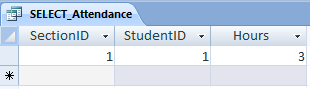
_____________________________________________________________________ ___________________________________________________ SELECT_Attendance SELECT SectionID, StudentID, Hours FROM Attendance WHERE DateAttended = DATE()
the resulting recordset displays the table columns as they are defined in the table:
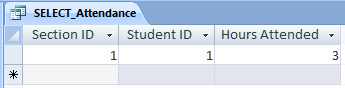
You can change the default column headings by providing your own column labels like this:
SELECT SectionID AS [Section ID], StudentID AS [Student ID], Hours AS [Hours Attended] FROM Attendance WHERE DateAttended = DATE()
Because custom labels have spaces, they are enclosed in pairs of square brackets like
[Hours Attended]
to protect the syntax entegrity of the SQL SELECT statement. The labels in the resulting recordset now change to
The SELECT column list can be extended by adding computations on numeric data combined with arithmetic operators:
Symbol Operation
------ ----------------
+ addition
– subtraction
/ division
* multiplication
For example,
SELECT ( Hours * 2 ) AS [Double Hours] FROM Attendance WHERE DateAttended = #02/29/2012#
The arithmetic operators can be used on any numeric column. Using parentheses,
( Hours * 2 )
is optional, but they help to avoid misunderstandings regarding overall SQL syntax.
To select records for a specific range,
SELECT SectionID, StudentID, Hours FROM Attendance WHERE Hours BETWEEN 10 AND 15
The BETWEEN ranges are inclusive. In this example, values 10 and 15 will be included in the results.
The LIKE operator compares a text column to a pattern.
_____________________________________________________________________ ______________________________________________________ SELECT_Address SELECT * FROM Address WHERE StreetLine1 LIKE '*Main*'
Here, wildcards * (asterisks) specify a pattern to match for any characters preceeding and following the word Main in the StreetLine1 column. That is,
StreetLine1 LIKE '*Main*'
will match column values
Main Street
100 Main St
200 Main Ave
...and so on...
See also:
msdn.microsoft.com
Like Operator
office.microsoft.com: Access SQL: basic concepts, vocabulary, and syntax
office.microsoft.com: Overview of Access SQL expressions