Course list http://www.c-jump.com/bcc/
Download c262_lab02.zip and unzip the file under the labs directory. You should get the directory structure
C:\bcc\GL262Labs\labs\c262_lab02
Go ahead and open Visual Studio project
C:\bcc\GL262Labs\labs\c262_lab02\c262_lab02.sln
Compile it:
Build -> Build Solution
(or simply press F7.)
This lab is focusing on getting the shaders to compile, link, and run in the GPU.
Notice there are two subdirectories:
C:\bcc\GL262Labs\labs\c262_lab02\Shaders
C:\bcc\GL262Labs\labs\c262_lab02\src
I decided to keep the shaders and C++ source files in two separate subdirectories.
Shaders are created in a form of a plain text. In the previous lab they were embedded directly in C++ program as character strings:
char* vertex_program =
"#version 150\n\n\
in vec4 vPosition;\n\n\
void main () {\n\
\tgl_Position = vPosition;\n\
}\n"
;
char* fragment_program =
"#version 150\n\n\
out vec4 fColor;\n\n\
void main () {\n\
\tfColor = vec4 (1.0, 0.0, 0.0, 1.0);\n\
}\n"
;
While this is okay, we may also need to load shaders from files. In this lab we have two files:
c262_lab02\Shaders\vertexShader_v.c
c262_lab02\Shaders\fragmentShader_f.c
Notice that the files have .C extensions. This is my own hack to load them into Visual Studio by dolble-clicking in Windows Explorer. Also, since GLSL syntax is similar to C, the editor colorizes common keywords and comments. Strictly speaking, I shouldn't have used .C file extension for shaders, but I kept it this way for the sake of convenience.
Shader is a program that runs on the GPU. All advanced work in graphics programming is done in shaders.
Shader is written in GLSL language, which is syntactically similar to C, but is very different in terms of what it does and where it executes.
GLSL has compound data types for vectors and matrices, as well as math functions to work with those types.
Shaders are written as plain text, just like source files in other programming languages.
A shader program is comprised of at least two shaders:
vertex shader, and
fragment shader
Each shader must be compiled at runtime before it can be used:
char const* vertex_program[] = {
"#version 150\n\n\
in vec4 vPosition;\n\n\
void main () {\n\
\tgl_Position = vPosition;\n\
}\n"
};
GLint vertex_shader_ID = glCreateShader( GL_VERTEX_SHADER );
glShaderSource( vertex_shader_ID, 1, vertex_program, NULL );
glCompileShader( vertex_shader_ID );
Compiled shaders must be linked into the shader program:
GLuint program_ID = glCreateProgram();
glAttachShader( program_ID, vertex_shader_ID );
glAttachShader( program_ID, fragment_shader_ID );
glLinkProgram( program_ID );
The shader program is compiled and linked only once -- during program initialization.
To draw something using a specific shader program, it has to be activated:
glUseProgram( program_ID );
In a program that uses animation, the glUseProgram() is invoked for every frame.
As mentioned above, there are at least two shaders in the shader program. The first is the vertex shader. The 3D geometry (aka models, meshes, or objects) are described by their vertices. For example, a cube needs 8 vertices, each specifying an ( x, y, z ) coordinate in 3D space:
3_ _ _7 (0.0 5.0 0.0) (5.0 5.0 0.0)
/| /|
4/_|_ 8/ | (0.0 5.0 5.0) (5.0 5.0 5.0)
| 1|_ _|_|5 (0.0 0.0 0.0) (5.0 0.0 0.0)
| / | /
|/_ _ _|/
2 6 (0.0 0.0 5.0) (5.0 0.0 5.0)
The vertex shader is responsible for scaling, rotating, and moving vertices around the scene. In other words, the vertex shader takes the original position of each vertex and places it somewhere in our "world" of 3D space.
A fragment shader:
is a program that determines the final color of pixels on the screen
often receives interpolated information from the vertex shader
calculates lighting of the rendered scene
The term "fragment" is closely associated with a pixel. While pixels are drawn on the screen, the fragments are smaller in size: the resulting pixel is made up of multiple fragments.
It is a common practice to use multiple vertex and fragment shaders in OpenGL program. Each shader is designated to work with different parts of the rendered scene. For example, one shader may be responsible for drawing the sky, another -- the terrain, and a number of others to draw buildings, cars, and people.
Look at the source files for the project in the downloaded lab:
C:\bcc\GL262Labs\labs\c262_lab02\Shaders
C:\bcc\GL262Labs\labs\c262_lab02\src
There are two shaders (.C) and three C++ files (.CPP and .H). Examine all files.
Now is the time to discuss the code and ask questions!!
Here is the list of changes to make:
Notice there is Shader.cpp file in the src subdirectory. Add this file to the project.
Open Shader.cpp in the source editor. The file includes the header, Shader.h:
#include "Shader.h"
Open the header file and examine the C++ class declared there.
Shader.cpp contains implementation of all member functions of the Shader class. However, the functions are empty and will not compile because many of them don't even have a required return statement.
Compare Shader.cpp side-by-side with the c262_lab02.cpp. Your job is to move code from c262_lab02.cpp to Shader.cpp, completing the Shader class implementation.
Most challenging part of this work is to finish everything required in the Shader class constructor:
Shader::Shader(const char* vertexFilename, const char* fragmentFilename){
// Read in the vertex program file
/*YOUR ANSWER*/
HINT: load_text_file()
// Read in the fragment program file
/*YOUR ANSWER*/
HINT: load_text_file()
// Check to make sure neither one is NULL. If so, print an error and exit
/*YOUR ANSWER*/
HINT: exit( 1 )
// Compile a vertex shader
/*YOUR ANSWER*/
HINT: compile_vertex_shader()
// Compile a fragment shader
/*YOUR ANSWER*/
HINT: compile_fragment_shader()
// Link the shader program and assign it to the "program_ID" variable
/*YOUR ANSWER*/
HINT: link_shader_program()
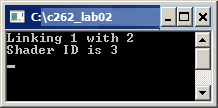
printf ("Shader ID is %d\n", program_ID);
// Clean up memory (the first two variables you created)
delete[] cstr_vertex_shader_source;
delete[] cstr_fragment_shader_source;
}
Remove those global functions in the c262_lab02.cpp that are now member functions of the Shader class.
Modify main() to use the brand-new Shader class. Make sure your code compiles and runs without any problems. The result should be:
The following fragment of code adds a geometry to draw a triangle:
// Add geometry to draw a red triangle on the screen
/*ANSWER*/
GLfloat vertices[] = {-0.5f, -0.5f, 0.0f,
0.5f, -0.5f, 0.0f,
0.0f, 0.5f, 0.0f};
triangle_vao = create_vertex_array();
upload_vertex_positions( myShader->program_ID, triangle_vao, vertices, 3 );
glUseProgram( myShader->program_ID );
//...
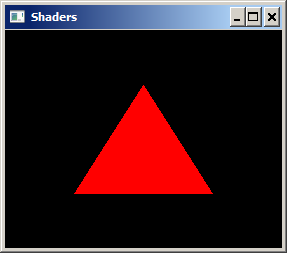
Find an appropriate place to copy and paste this code. Compile and run the program. The result should be:
There are no files to submit.
Demonstrate a working c262_lab02 program to your instructor.