Explore the external subdirectory. Understand that you don't have to install any of those because they're just a bunch of DLL, LIB, and C++ header files.
C++ header files are plain text files that contain declarations of functions and constant variables.
Function declarations are functions without a body. For example,
    // myheader.h
    // Function declaration:
    bool load_data_from_file( char const* filename );
Once the header is included in your C++ program, you can call this function
    // main.cpp
    #include "myheader.h"

    int main( int argc, char* argv[] )
    {
        bool success = false;
        success = load_data_from_file( "C:/data/mydata.txt" );
        if ( !success ) {
            // could not load data from file
        } else {
            // everything is good
        }
        return 0;
    }
There are two possibilities where function load_data_from_file() can be defined:
-
(a) you implement it in your own C++ file and compile
-
(b) it is written by someone else and exists in a binary form inside a DLL (dynamic link library)
What's the difference?
-
(a) no additional steps required
-
(b) you need to tell the linker where in a DLL the function implementation is. The way you do it -- specify a path to the LIB file in "Additional Library Directories" and "Additional Dependencies" of your linker's configuration.
-
And, where are the DLLs themselves? -- in our case -- in the same location where our EXE file is written. The reason is because when your program runs, it searches the local directory (the place the program is run from) for the DLL first. If it can't find it, it looks in anything that your $PATH environment variable specifies.
-
There are actually two places where our EXE files may be written:
    C:\bcc\GL262Labs\bin\Debug
    C:\bcc\GL262Labs\bin\Release
It depends whether you use "Debug" or "Release" configuration in your project. Most programmers test their code under both configurations.
Note: if EXE couldn't find your DLL, you get a message box like this:
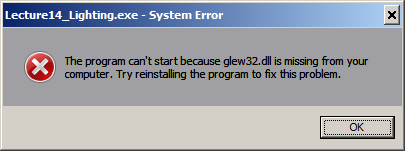
A LIB file (or library) contains binary code used by the linker to link the code into an executable file. We use a type of .lib files that contain indirect references to DLL functions, which are also binary code.
Go ahead and open Visual Studio project
C:\bcc\GL262Labs\labs\c262_lab01\c262_lab01.sln
Compile it:
Build -> Build Solution
(or simply press F7.)
When you compile your program,
-
All CPP files are compiled into OBJ files by the C++ compiler
-
All OBJ and LIB files are linked together and written into the EXE file by the linker.
When you run your EXE program, the DLLs are also loaded into memory, and program starts making calls into those DLLs.