-
Perspective interpolation
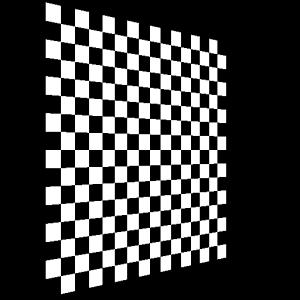
-
No perspective interpolation
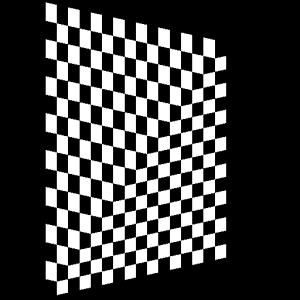
Course list http://www.c-jump.com/bcc/
Vertex Shading Stage
vertex buffer data is processed on per-vertex basis
we must provide a vertex shader and have it bound by glUseProgram(shader_program_ID)
Tesselation Stage
optional: additional per-vertex processing
Geometry Shading Stage
optional: additional work with geometry (triangles, lines, points)
Rasterization (not programmable)
Uncolored fragments (pixel candidates) are generated
Fragment Shading Stage
per-fragment (pixel) processing: colors assigned, depth values computed
we must provide a fragment shader and have it bound by glUseProgram(shader_program_ID)
Compute Shading Stage
another chance to access buffers already generated
general purpose processing
How does the data flow between the stages?
OpenGL C++ App                            Vertex Shader
     C array[] ------"attributes"-------> in global variables
Vertex Attributes are global variables specified for every vertex
Client program creates C arrays with model data and uploads to the graphics card
Shader declares globals with in access modifier
in attributes are read-only values
There is a maximum limit of 16 attributes per shader program
|
|
|
|
OpenGL C++ App                            Vertex Shader
     C array[] ------"attributes"-------> in global variables
     glm::mat4 ------"matrices"---------> uniform variables        Fragment Shader
     glm::mat4 ------"matrices"----------------------------------> uniform variables
More about data flow between the stages...
OpenGL C++ App                            Vertex Shader
     C array[] ------"attributes"-------> in global variables
     glm::mat4 ------"matrices"---------> uniform variables        Fragment Shader
     glm::mat4 ------"matrices"----------------------------------> uniform variables
                                          out variables----------> in variables
For every vertex shader out, there is a fragment shader in variable
Value is smoothly interpolated from vertex shader
Fragment shaders also have an out variable:
called output zero
Sent to the color buffer
Represents the color of the fragment
Syntax is similar to C
Supports functions
Has variables similar to C:
    bool finished = false;
    int myInt = -6;
    uint = 567u;
    float value = 42.0;
void float int bool
GLSL supports vectors with 2, 3 and 4 elements
Floating point
vec2, vec3, vec4
Integer
    ivec2, ivec3, ivec4
    uvec2, uvec3, uvec4
Boolean
bvec2, bvec3, bvec4
Initialization is done by constructor:
vec4 color = vec4( 1.0f, 0.0f, 1.0f, 1.0f );
Grouping, function/constructor ()
      Array/component indexing []
    Component/member selection .
                         Unary ++  --  +  -  !
                        Binary *  /  +  -
                    Relational <  <=  >  >=  ==  !=
                       Logical &&  ^^  ||
           Ternary conditional ?:
                    Assignment =  *=  /=  +=  -=
                      Sequence ,
All common vector operators are available:
    result = myVec + yourVec;
    myVec += vec4 (1.0f, 0.5f, 0.4f, 0.2f);
    myVec *= 3.0f;
Individual elements of vectors and matrices can be accessed via name component accessors
xyzw – typically for positions
rgba – usually for colors
stpq – usually for texture coordinates
For example,
    my_vec.x = 4.0f;
    my_vec.xy = vec2( 1.0f, 5.0f );
    my_vec.xyz = another_vec.xyz;
    float pos_z = pos.z;
    color = color.abgr; // components reversed in color (vec4)
    color.abgr = color; // the same resuilt
The last example is called component swizzling
Vector operations are supported by GPU hardware directly
This is slower:
    vPos.x = vPos2.x + 1.0f;
    vPos.y = vPos2.y + 3.0f;
    vPos.z = vPos2.z + 2.0f;
This is faster:
vPos.xyz = vPos2.xyz + vec3( 1.0f, 3.0f, 2.0f );
GLSL indexing for vector and matrix component selection
    mat4 myMatrix = mat4(1.0);
    foo.x = foo[2];          // same as foo.x = foo.z;
    foo = myMatrix[0];       // first column of matrix
    foo.x = myMatrix[0][0];  // first column, first row
Square matrices
mat2 mat3 mat4 == mat2x2 mat3x3 mat4x4
Other matrix types
mat2x3 mat2x4 mat3x2 mat3x4 mat4x2 mat4x3
Matrices are organized as an array of column vectors
    mMV[3] = vec4( 1.0f, 0.0f, 1.0f, 1.0f );
    vec3 myVec = mMV[3].xyz;
Matrices can be multiplied by other matrices and vectors
Matrices provide a long constructor:
    mat4 my_matrix = mat4 (
        1.0f, 0.0f, 0.0f, 0.0f,
        0.0f, 1.0f, 0.0f, 0.0f,
        0.0f, 0.0f, 1.0f, 0.0f,
        0.0f, 0.0f, 0.0f, 1.0f
        );
and a short version of the constructor:
mat4 my_matrix = mat4( 1.0f ); // constructs identity matrix
in passed in from a previous stage
out going to the next stage
const a read-only variable (one that doesn't change)
uniform does not change across vertices
inout only used in functions (it's essentially a pointer)
flat don't interpolate (colors) at all; declared in both vertex and frag shaders
smooth the default interpolation
noperspective don't use perspectively-correct interpolation
in centroid/out centroid used in multisampled buffers (interpolation)
|
|
GLSL provides numerous mathematical functions for scalars, vectors, and matrices:
    log( ) // natural log
    exp( ) // exponent
    log2( ) // log base 2
    exp2( ) // 2 to the power of...
    sqrt( )
For example,
    vec2 results = pow( vec2( 2, 3 ), vec2( 2, 2 ) );	// 2^2, 3^2
    float x = sin( 1.0 );         // Also cos, tan, atan, asin...
    float z = radians( 45.0f );   // Converts from degrees to radians
    float z = degrees( 0.6f );    // Converts from radians to degrees
Overloaded for all vecN data types:
    float length (vec x);
    float distance (vec p0, vec p1);
    float dot (vec x, vec y);
    vec3 cross (vec x, vec y);
    vec normalize (vec x);
    vec reflect (vec I, vec N); // I is incident vector (light/view) and N is normal
    vec refract(vec I, vec N, float eta);
    vec faceForward (vec N, vec I, vec nRef);// if dot(Nref, I) < 0, return N, else return -N
    abs, sign, floor, ceil, mod, min, max
    trunc(x) // nearest whole number not larger than the absolute value of x
    round(x) // based on 0.5

    // Returns a value equal to the nearest integer to x.
    // The fractional part of 0.5 will round toward the nearest even integer.
    // For example, both 3.5 and 4.5 will round to 4.0:
    roundEven(x)

    fract (x) // returns the fractional part
    clamp(x, y, z) // returns x if it's between y and z, else returns y or z
    mix (x, y, a) // returns the linear blend of x and y, as a varies from 0 to 1
    step (edge, x) // returns 0.0 if x < edge, 1.0f otherwise
    smoothstep (edge0, edge1, x) // returns  0 if x < edge0, 1 if x > edge1, interpolated otherwise
    isnan(x) // true is x is not a number (NAN)
    isinf(x) // returns true if x is infinity
    floatBitsToInt(x) // converts floating point values to ints
    intBitstoFloat(x) // converts integers to floating points
Structures: struct
Arrays: []