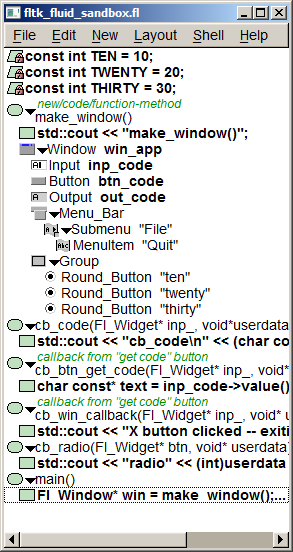
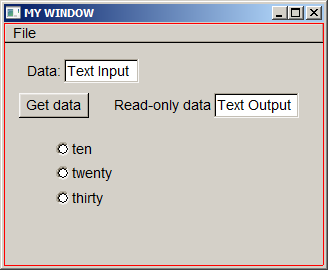
The following FLUID v 1.3.0 project ( fltk_fluid_sandbox.fl ) demonstrates complete steps of this lab:
|
|
-
Here is the FLUID-generated code:
// generated by Fast Light User Interface Designer (fluid) version 1.0300 #ifndef fltk_fluid_sandbox_h #define fltk_fluid_sandbox_h #include <FL/Fl.H> #include <FL/Fl_Window.H> extern Fl_Window *win_app; #include <FL/Fl_Input.H> extern Fl_Input *inp_code; #include <FL/Fl_Button.H> extern Fl_Button *btn_code; #include <FL/Fl_Output.H> extern Fl_Output *out_code; #include <FL/Fl_Menu_Bar.H> #include <FL/Fl_Group.H> #include <FL/Fl_Round_Button.H> Fl_Window* make_window(); extern Fl_Menu_Item menu_[]; void cb_code(Fl_Widget* inp_, void*userdata); void cb_btn_get_code(Fl_Widget* inp_, void* userdata_); void cb_win_callback(Fl_Widget* inp_, void* userdata_); void cb_radio(Fl_Widget* btn, void* userdata); #endif
// generated by Fast Light User Interface Designer (fluid) version 1.0300
#include "fltk_fluid_sandbox.h"
static const int TEN = 10;
static const int TWENTY = 20;
static const int THIRTY = 30;
Fl_Window *win_app=(Fl_Window *)0;
Fl_Input *inp_code=(Fl_Input *)0;
Fl_Button *btn_code=(Fl_Button *)0;
Fl_Output *out_code=(Fl_Output *)0;
Fl_Menu_Item menu_[] = {
{"File", 0, (Fl_Callback*)cb_win_callback, 0, 64, FL_NORMAL_LABEL, 0, 14, 0},
{"Quit", 0, (Fl_Callback*)cb_win_callback, 0, 0, FL_NORMAL_LABEL, 0, 14, 0},
{0,0,0,0,0,0,0,0,0},
{0,0,0,0,0,0,0,0,0}
};
/**
new/code/function-method
*/
Fl_Window* make_window() {
std::cout << "make_window()";
{ win_app = new Fl_Window(320, 243, "MY WINDOW");
win_app->callback((Fl_Callback*)cb_win_callback);
{ inp_code = new Fl_Input(60, 36, 75, 24, "Data:");
inp_code->callback((Fl_Callback*)cb_code, (void*)("input"));
} // Fl_Input* inp_code
{ btn_code = new Fl_Button(15, 70, 70, 25, "Get data");
btn_code->callback((Fl_Callback*)cb_btn_get_code);
} // Fl_Button* btn_code
{ out_code = new Fl_Output(210, 70, 75, 25, "Read-only data");
} // Fl_Output* out_code
{ Fl_Menu_Bar* o = new Fl_Menu_Bar(0, 0, 320, 20);
o->menu(menu_);
} // Fl_Menu_Bar* o
{ Fl_Group* o = new Fl_Group(50, 117, 155, 68);
{ Fl_Round_Button* o = new Fl_Round_Button(50, 117, 155, 18, "ten");
o->type(102);
o->down_box(FL_ROUND_DOWN_BOX);
o->callback((Fl_Callback*)cb_radio, (void*)(10));
} // Fl_Round_Button* o
{ Fl_Round_Button* o = new Fl_Round_Button(50, 140, 155, 20, "twenty");
o->type(102);
o->down_box(FL_ROUND_DOWN_BOX);
o->callback((Fl_Callback*)cb_radio, (void*)(20));
} // Fl_Round_Button* o
{ Fl_Round_Button* o = new Fl_Round_Button(50, 165, 155, 20, "thirty");
o->type(102);
o->down_box(FL_ROUND_DOWN_BOX);
o->callback((Fl_Callback*)cb_radio, (void*)(30));
} // Fl_Round_Button* o
o->end();
} // Fl_Group* o
win_app->end();
win_app->resizable(win_app);
} // Fl_Window* win_app
return win_app;
}
void cb_code(Fl_Widget* inp_, void*userdata) {
std::cout << "cb_code\n" << (char const*)userdata;
}
/**
callback from "get code" button
*/
void cb_btn_get_code(Fl_Widget* inp_, void* userdata_) {
char const* text = inp_code->value();
out_code->value( text );
}
/**
callback from "get code" button
*/
void cb_win_callback(Fl_Widget* inp_, void* userdata_) {
std::cout << "X button clicked -- exiting the program\n";
exit( 0 );
}
void cb_radio(Fl_Widget* btn, void* userdata) {
    std::cout << "radio" << (int)userdata << '\n';
}
int main(int argc, char **argv) {
Fl_Window* win = make_window();
win->show();
return Fl::run();
}