Course list http://www.c-jump.com/bcc/
Program organization requires data and actions:
|
shuffle | deal | bet | hit | stand | etc... actions |
| card | · | · | · | · | · | |
| suite | · | · | · | · | · | |
| deck | × | · | · | · | · | |
| bank | · | · | · | · | · | |
| hand | · | × | · | · | · | |
| score | · | · | · | · | · | |
| dealer | · | · | · | · | × | |
| player | · | · | × | × | × | |
| etc... objects | · | · | · | · | · |
|
|
|
A C program is a set of:
variable definitions and
functions
Functions encapsulate computation. For example:
main( ) is a top-level entry into program
math library functions: sqrt(), sin(), cos(), etc.
functions for data input/output: printf(), fgets(), etc.
algorithm functions: sort(), copy(), find(), etc.
functions to validate and store data
C++ <cmath> header brings collection of math functions such as:
log( x ); // natural logarithm of x
pow( x, y ); // x raised to power y
sin( x ); // trigonometric sine of x
sqrt( x ); // square root of x
tan( x ); // trigonometric tangent.For example,
For example,
#include <iostream>
#include <cmath>
int main()
{
double result = sqrt( 1234.5 );
std::cout << "Square root of 1234.5 is " << result << '\n';
return 0;
}
#include <iostream>
#include <cctype>
// isalpha(c) non-zero if c is alphabetic, 0 if not
// isupper(c) non-zero if c is upper case, 0 if not
// islower(c) non-zero if c is lower case, 0 if not
// isdigit(c) non-zero if c is digit, 0 if not
// isalnum(c) non-zero if isalpha(c) or isdigit(c), 0 if not
// isspace(c) non-zero if c is blank, tab, newline, return, formfeed, vertical tab
// toupper(c) return c converted to UPPER CASE
// tolower(c) return c converted to lower case
int main( )
{
char ch = 'A';
int result = isalpha( ch );
std::cout << "The result is " << result << '\n';
return 0;
}
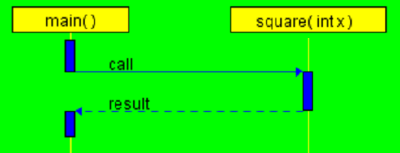
int square( int x )
{
return x * x;
}
int main( )
{
int value = 5;
int result = square( value );
return 0;
}
Demo: download and run cjumpcxx.exe , then click
Functions,
square( )
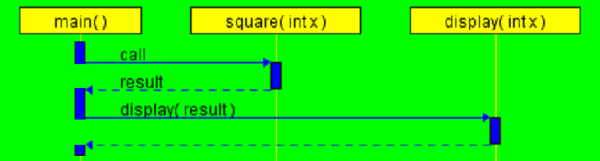
#include <iostream>
int square( int x )
{
return x * x;
}
void display( int x )
{
std::cout << x;
}
int main( )
{
int value = 5;
int result = square( value );
display( result );
return 0;
}
Each function definition has the form:
return-type function-name( argument-declarations )
{
/* variable declarations and statements */
}
A minimal function is:
void dummy( ) { }
which does nothing and returns nothing.
A do-nothing functions sometimes are useful as a placeholder during program development.
Sometimes function need to call each other like this:
|
|
Let's try a ping-pong program: :
#include <iostream>
int shot_count = 0;
void ping()
{
if ( shot_count > 6 ) return;
++shot_count; // count each shot
std::cout << " ping! ";
pong();
}
void pong()
{
if ( shot_count > 6 ) return;
++shot_count; // count each shot
std::cout << " pong! ";
ping();
}
int main()
{
ping(); // lets play!
std::cout << "\n Game over!\n";
return 0;
}
The problem is easily solved by adding function declarations:
#include <iostream>
// function declarations:
void ping();
void pong();
int shot_count = 0;
void ping()
{
if ( shot_count > 6 ) return;
++shot_count; // count each shot
std::cout << " ping! ";
pong();
}
void pong()
{
if ( shot_count > 6 ) return;
++shot_count; // count each shot
std::cout << " pong! ";
ping();
}
int main()
{
ping(); // lets play!
std::cout << "\n Game over!\n";
return 0;
}
A few observations:
did ping-pong program work as expected?
How many shots were printed?
Let's try a few improvements:
Change the program to play exactly 6 shots
Consider using a new variable: MAX_SHOTS
What if we want the user to say how many shots to play?
Functions can have input parameters:
int max_value( int x, int y )
{
if ( x > y ) {
return x;
}
return y;
}
The return statement is the mechanism for returning a value:
return expression;
Type of the returned value has to agree with the function prototype
The calling function is free to ignore the returned value
We may need an early return from a function that is void:
void ping()
{
if ( shot_count > 6 ) return; // early return from ping()
++shot_count; // count each shot
std::cout << " ping! ";
pong();
return; // redundant -- not required -- and usually a bad style!
}
Why use functions ?
Functions break large computing tasks into smaller ones.
Functions enable people to build on what others have done, instead of starting over from scratch.
Functions hide details of operation from other parts of the program