Course list http://www.c-jump.com/bcc/

CIS-123 Introduction


  1. Welcome!
  2. Basic Concepts
  3. C, C++, and Java
  4. C, C++, and Java, cont.
  5. Memory as numbered boxes
  6. Curly braces
  7. What is an executable instruction?
  8. Text segment
  9. Data segment
  10. Uninitialized data segment
  11. Stack memory segment
  12. Heap memory
  13. What is a local variable?
  14. Displaying a memory address
  15. Binary numbers
  16. Binary numbers and computer architecture
  17. The binary numbers and humans
  18. Hexadecimal notation

1. Welcome!


2. Basic Concepts


3. C, C++, and Java


4. C, C++, and Java, cont.


  • 
    /* Hello World program in C */
    #include <stdio.h>
    int main()
    {
      printf( "Hello, World!\n" );
      return 0;
    }
    
    
  • 
    // Hello World program in C++
    #include <iostream>
    int main()
    {
      std::cout << "Hello, World!\n";
      return 0;
    }
    
    
  • 
    // Hello World program in Java
    public class HelloWorld
    {
      public static void main(String[] args)
      {
        System.out.println( "Hello, World\n" );
      }
    }


5. Memory as numbered boxes

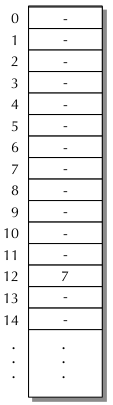
  • Programmer's view of computer memory is extremely simplified...

    • ...a long sequence of "placeholders" or "boxes" representing individual memory locations.

  • Each memory location can be accessed at the same speed, hence the name RAM,
    "Random Access Memory".

  • In order to allow the processor to uniquely specify each location, the slots are sequentially numbered starting at 0.

  • The number corresponding to a given slot is called its address.

  • Value 7 stored at location 12

  • Value 7 stored at location 12


6. Curly braces


7. What is an executable instruction?


8. Text segment


9. Data segment


    program in computer memory
  • Initialized data segment (or simply the data segment), contains variables that

    • (a) are specifically initialized in the program.

    • (b) declared outside any function

  • For example,

  • 
        #include <iostream>
        double Pi = 3.1415926;
        int main()
        {
          std::cout << "Pi equals " << Pi << '\n';
          return 0;
        }


    Variables declared outside any function are called global variables.

    Pi demonstrates an initialized global variable.


10. Uninitialized data segment


11. Stack memory segment


12. Heap memory


13. What is a local variable?


14. Displaying a memory address


15. Binary numbers


16. Binary numbers and computer architecture


17. The binary numbers and humans


18. Hexadecimal notation


  • Simplifies notation of bit patterns.

  • Much better alternative, compared to binary number notation.

  • Simplifies notation of long binary strings, such as entire blocks of computer memory.

  • Hexadecimal notation is used mainly for human convinience.

  • Hexadecimal notation represents numbers
    of base 16, calculated as

    • h3*163 + h2*162 + h1*161 + h0*160

    where h3, h2, h1, and h0 are values from the Hexadecimal column of the table.

  •  

    Decimal Hexadecimal Octal Binary
    0
    1
    2
    3
    4
    5
    6
    7
    8
    9
    10
    11
    12
    13
    14
    15
    0
    1
    2
    3
    4
    5
    6
    7
    8
    9
    A
    B
    C
    D
    E
    F
    000
    001
    002
    003
    004
    005
    006
    007
    010
    011
    012
    013
    014
    015
    016
    017
    0000
    0001
    0010
    0011
    0100
    0101
    0110
    0111
    1000
    1001
    1010
    1011
    1100
    1101
    1110
    1111