CIS-77 Home http://www.c-jump.com/CIS77/CIS77syllabus.htm
In this section:
data allocation
data types and sizes
pointers to objects in memory
MOV instruction, copying data
sign-extending integers
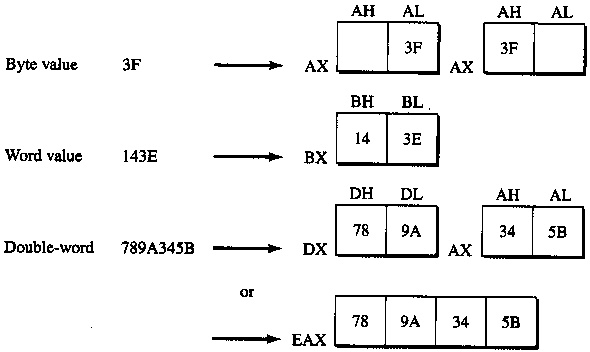
Intel x86 CPU performs operations on different sizes of data.
An integer is a whole number with no fractional part.
In assembler, the variables are created by data allocation directives.
Assembler declaration of integer variable assigns a label to a memory space allocated for the integer.
The variable name becomes a label for the memory space. For example,
MyVar db 77h ; byte-sized variable called MyVar initialised to 77h
where
MyVar is variable name
db is directive for byte-sized memory allocation
77h is initializer specifying initial value.
|
|
Consider a small program, little_endian.asm .
Assembler fragment of little_endian.lst listing file shows generated data and code:
00000000 .DATA 00000000 EE FF byte0 BYTE 0EEh, 0FFh 00000002 1234 word2 WORD 1234h 00000004 56789ABC var4 DWORD 56789ABCh 00000008 00000000 var8 DWORD 0 00000000 .CODE 00000000 _start: 00000000 B8 00000002 R mov eax, OFFSET word2 00000005 A3 00000008 R mov [var8], eax 0000000A C3 ret ; Exit program
DUMPBIN output for this program yields:
C:\>DUMPBIN /DISASM little_endian.exe Dump of file E:\little_endian.exe File Type: EXECUTABLE IMAGE __start: 00301000: B8 02 40 30 00 mov eax,304002h 00301005: A3 08 40 30 00 mov dword ptr ds:[00304008h],eax 0030100A: C3 ret
Did you notice something strange about highlighted opcodes?
The byte sequence that belongs to the 32-bit displacement seems out of order: instead of expected
00 30 40 08
we see a reversed sequence,
08 40 30 00.
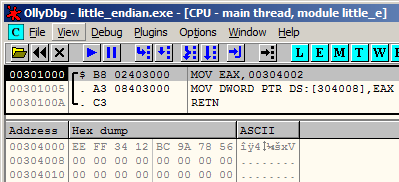
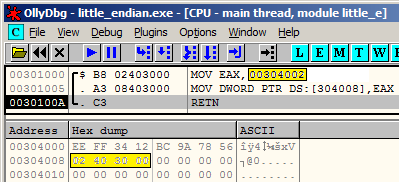
Step-by step execution of little_endian.asm program in debugger view looks like this:
|
|
The byte sequence of 304002h was reversed when the value was stored in memory.
Note that command switch /base:0x300000 was used to change the base address of the executable image:
LINK /base:0x300000 /debug /subsystem:console /entry:_start /out:little_endian.exe little_endian.obj
|
|
||||||||||||||||||||
|
|
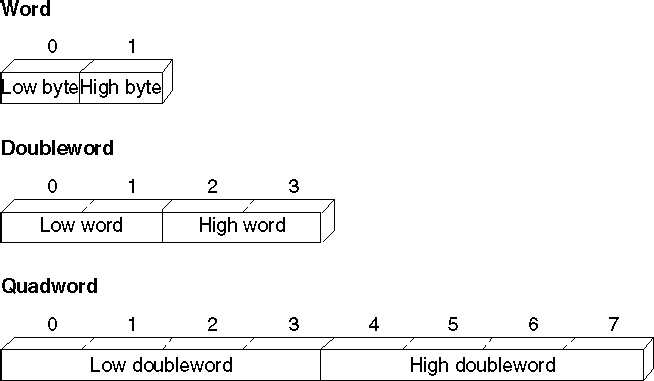
Five define directives allocate memory space for initialized data:
DB Define Byte, allocates 1 byte
DW Define Word, allocates 2 bytes
DD Define Doubleword, allocates 4 bytes
DQ Define Quadword, allocates 8 bytes
DT Define Ten bytes, allocates 10 bytes
Examples:
sorted DB 'y'
value DW 25159
Total DD 542803535
float1 DD 1.234
Multiple definitions can be abbreviated.
For example,
message DB 'B'
DB 'y'
DB 'e'
DB 0DH
DB 0AH
can be written as
message DB 'B', 'y', 'e', 0DH, 0AH
and even more compactly as
message DB 'Bye', 0DH, 0AH
Multiple definitions can be cumbersome to initialize data structures such as arrays
For example, to declare and initialize an integer array of 8 elements
values DW 0, 0, 0, 0, 0, 0, 0, 0
What if we want to declare and initialize to zero an array of a lot more elements?
Assembler provides a better way of doing this by DUP directive:
values DW 8 DUP (0)
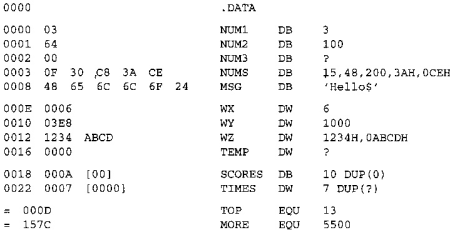
For multiple data directives Assembler builds a symbol table
Both offset (in bytes) and label refer to the allocated storage space in memory:
; label memory
; name offset
.DATA ; -------- -------
value DW 0 ; value 0
sum DD 0 ; sum 2
marks DW 10 DUP (?) ; marks 6
message DB 'The grade is:',0 ; message 26
char1 DB ? ; char1 40
Directive C data type
---------- ---------------------
DB char
DW int, unsigned int
DD float, long
DQ double
DT internal intermediate float value
| Keyword | Description |
|---|---|
| BYTE, DB (byte) | Allocates unsigned numbers from 0 to 255. |
| SBYTE (signed byte) | Allocates signed numbers from 128 to +127. |
| WORD, DW (word = 2 bytes) | Allocates unsigned numbers from 0 to 65,535 (64K). |
| SWORD (signed word) | Allocates signed numbers from 32,768 to +32,767. |
| DWORD, DD (doubleword = 4 bytes) | Allocates unsigned numbers from 0 to 4,294,967,295 (4 megabytes) |
| SDWORD (signed doubleword) | Allocates signed numbers from 2,147,483,648 to +2,147,483,647. |
| FWORD, DF (farword = 6 bytes) | Allocates 6-byte (48-bit) integers. These values are normally used only as pointer variables on the 80386/486 processors. |
| QWORD, DQ (quadword = 8 bytes) | Allocates 8-byte integers used with 8087-family coprocessor instructions. |
| TBYTE, DT (10 bytes) | Allocates 10-byte (80-bit) integers if the initializer has a radix specifying the base of the number. |
|
|
|
|
There are five reserve directives:
RESB Reserve a Byte, allocates 1 byte
RESW Reserve a Word, allocates 2 bytes
RESD Reserve a Doubleword, allocates 4 bytes
RESQ Reserve a Quadword, allocates 8 bytes
REST Reserve a Ten bytes, allocates 10 bytes
Examples:
response resb 1
buffer resw 100
Total resd 1
CPU has instructions to copy, move, and sign-extend integer values.
These instructions require operands to be the same size.
However, we may need to operate on data with size other than that originally declared.
The PTR operator forces expression to be treated as the specified type:
.DATA
num DWORD 0
.CODE
mov ax, WORD PTR num[0] ; Load a word-size value from
mov dx, WORD PTR num[2] ; a doubleword variable
PTR operator re-casts the DWORD-sized memory location pointed by num[ index ] expression into a WORD-sized value.
The primary instructions for moving data from operand to operand and loading them into registers are
MOV (Move)
XCHG (Exchange)
CWD (Convert Word to Double)
CBW (Convert Byte to Word).
MOV instruction is a copy instruction.
MOV copies the source operand to the destination operand without affecting the source.
; Immediate value moves
mov ax, 7 ; Immediate to register
mov mem, 7 ; Immediate to memory direct
mov mem[bx], 7 ; Immediate to memory indirect
; Register moves
mov mem, ax ; Register to memory direct
mov mem[bx], ax ; Register to memory indirect
mov ax, bx ; Register to register
mov ds, ax ; General register to segment register
; Direct memory moves
mov ax, mem ; Memory direct to register
mov ds, mem ; Memory to segment register
; Indirect memory moves
mov ax, mem[bx] ; Memory indirect to register
mov ds, mem[bx] ; Memory indirect to segment register
; Segment register moves
mov mem, ds ; Segment register to memory
mov mem[bx], ds ; Segment register to memory indirect
mov ax, ds ; Segment register to general register
The following example shows several common types of moves that require not one, but two instructions.
; Move immediate to segment register
mov ax, DGROUP ; Load AX with immediate value
mov ds, ax ; Copy AX to segment register
; Move memory to memory
mov ax, mem1 ; Load AX with memory value
mov mem2, ax ; Copy AX to other memory
; Move segment register to segment register
mov ax, ds ; Load AX with segment register
mov es, ax ; Copy AX to segment register
The XCHG (exchange data) instruction exchanges the contents of two operands.
There are three variants:
XCHG reg, reg XCHG reg, mem XCHG mem, reg
You can exchange data between registers or between registers and memory, but not from memory to memory:
xchg ax, bx ; Put AX in BX and BX in AX
xchg memory, ax ; Put "memory" in AX and AX in "memory"
xchg mem1, mem2 ; Illegal, can't exchange memory locations!
The rules for operands in the XCHG instruction are the same as those for the MOV instruction...
...except that XCHG does not accept immediate operands.
In array sorting applications, XCHG provides a simple way to exchange two array elements.
Few more examples using XCHG:
xchg ax, bx ; exchange 16-bit regs
xchg ah, al ; exchange 8-bit regs
xchg eax, ebx ; exchange 32-bit regs
xchg [response], cl ; exchange 8-bit mem op with CL
xchg [total], edx ; exchange 32-bit mem op with EDX
Without the XCHG instruction, we need a temporary register to exchange values if using only the MOV instruction.
To exchange two memory operands, use a register as a temporary container and combine MOV with XCHG. For example,
.DATA
val1 WORD 1000h
val2 WORD 2000h
.CODE
mov ax, [val1] ; AX = 1000h
xchg ax, [val2] ; AX = 2000h, val2 = 1000h
mov [val1], ax ; val1 = 2000h
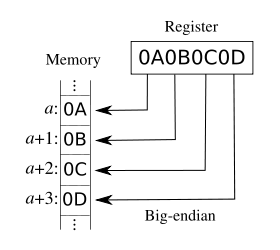
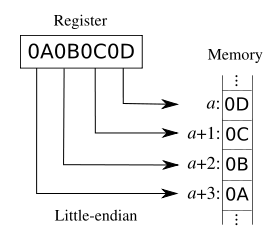
The XCHG instruction is useful for conversion of 16-bit data between little endian and big endian forms.
xchg al, ah
For example, the following XCHG converts the data in AX into the other endian form.
Pentium provides BSWAP instruction to do similar conversion on 32-bit data:
BSWAP 32-bit register
Note: BSWAP works only on data located in a 32-bit register.
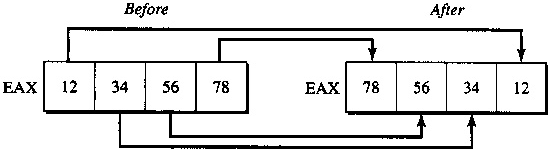
BSWAP swaps bytes of its operand. For example,
bswap eax
Result of BSWAP EAX
Since moving data between registers of different sizes is illegal, you must sign-extend integers to convert signed data to a larger size.
Sign-extending means copying the sign bit of the unextended operand to all bits of the operand's next larger size.
This widens the operand while maintaining its sign and value.
The four instructions presented below act only on the accumulator register (AL, AX, or EAX), as shown:
| Instruction | Sign-extend |
|---|---|
| CBW (convert byte to word) | AL to AX |
| CWD (convert word to doubleword) | AX to DX:AX |
| CWDE (convert word to doubleword extended) | AX to EAX |
| CDQ (convert doubleword to quadword) | EAX to EDX:EAX |
Consider:
.DATA
mem8 SBYTE -5
mem16 SWORD +5
mem32 SDWORD -5
.CODE
.
.
.
mov al, mem8 ; Load 8-bit -5 (FBh)
cbw ; Convert to 16-bit -5 (FFFBh) in AX
mov ax, mem16 ; Load 16-bit +5
cwd ; Convert to 32-bit +5 (0000:0005h) in DX:AX
mov ax, mem16 ; Load 16-bit +5
cwde ; Convert to 32-bit +5 (00000005h) in EAX
mov eax, mem32 ; Load 32-bit -5 (FFFFFFFBh)
cdq ; Convert to 64-bit -5
; (FFFFFFFF:FFFFFFFBh) in EDX:EAX
Sign extending instructions efficiently convert unsigned values as well, provided the sign bit is zero.
This example, for instance, correctly widens mem16 whether you treat the variable as signed or unsigned.
The processor does not differentiate between signed and unsigned values.
For instance, the value of mem8 in the previous example is literally 251 (0FBh) to the processor.
It ignores the human convention of treating the highest bit as an indicator of sign.
The processor can ignore the distinction between signed and unsigned numbers because binary arithmetic works the same in either case.
The programmer, not the processor, must keep track of which values are signed or unsigned, and treat them accordingly.
If sign extension was not what you had in mind, that is, if you need to extend the unsigned value, explicitly set the higher register to zero:
.DATA
mem8 BYTE 251
mem16 WORD 251
.CODE
.
.
.
mov al, mem8 ; Load 251 (FBh) from 8-bit memory
sub ah, ah ; Zero upper half (AH)
mov ax, mem16 ; Load 251 (FBh) from 16-bit memory
sub dx, dx ; Zero upper half (DX)
sub eax, eax ; Zero entire extended register (EAX)
mov ax, mem16 ; Load 251 (FBh) from 16-bit memory
The 80386/486/Pentium processors provide instructions that move and extend a value to a larger data size in a single step.
MOVSX moves a signed value into a register and sign-extends it with 1.
MOVZX moves an unsigned value into a register and zero-extends it with zero.
mov bx, 0C3EEh ; Sign bit of bl is now 1: BH == 1100 0011, BL == 1110 1110
movsx ebx, bx ; Load signed 16-bit value into 32-bit register and sign-extend
; EBX is now equal FFFFC3EEh
movzx dx, bl ; Load unsigned 8-bit value into 16-bit register and zero-extend
; DX is now equal 00EEh
MOVSX and MOVZX instructions usually execute much faster than the equivalent CBW, CWD, CWDE, and CDQ.
Belongs to the family of x86 data transfer instructions.
XLATB translates bytes The format is XLATB
To use xlat instruction,
EBX should be loaded with the starting address of the translation table
AL must contain an index in to the table.
Index value starts at zero
The instruction
reads the byte at this index in the translation table, and
stores this value in AL.
The original index value in AL is lost
Translation table can have at most 256 entries (due to AL)
See also XLAT.ASM sample.