-
    std::cout << "HELLO";
    std::cout << '\n';
    std::cout << 123;
Course List http://www.c-jump.com/bcc/
Standard Output cout, cerr
Standard Input cin
Formatting
Error handling
File I/O (later)
network communication
encryption
data compression
persistent storage of objects
character-oriented input and output
|
|
|
Output stream buffer:
| H | E | L | L | O | \n | 1 | 2 | 3 | ... | ... |
Input stream buffer:
| 4 | 5 | 6 | \n | 7 | 8 | 9 | \n | ... | ... |
|
|
|
Objects are C++ variables of user-defined types. They are declared as
typename object_name;
For example, if Shape3D is a user-defined type, then we could try
    Shape3D widget;               // create object named "widget"

    widget.display( parameters ); // call member function with parameters

    widget.reset( );              // call member function without parameters
Dot-notation is used to access functions built into objects.
Alternatively, some objects may allow use of arithmetic operators. For example,
std::cout << widget; // display widget on console output device
    typename      object name
    ------------  -----------
    std::ostream  std::cout;  // cout is a predefined object
Usage example:
    #include <iostream> // C++ standard library header

    using std::cout;    // cout declared inside std namespace

    int main()
    {
        int x = 65;
        cout << x;      // display value of number 65
        cout.put( x );  // display character 'A'
        return 0;
    }

    /* This program prints:
    65A
    */
std::cout is a pre-defined object
We need to
#include <iostream>
to bring std::cout into our program
std::cout is attached to the standard output device, which can be console display, file, or printer.
I/O redirection to file or printer is made easy:
CMD> myprogram > myfile.txt
The above command sends standard output to myfile.txt
|
|
    typename      object name
    ------------  -----------
    std::istream  std::cin;    // cin is a predefined object
Usage:
    // formatted input of C++ variables
    int x;
    cin >> x;

    // unformatted input of single characters
    char x = cin.get( );

    // line-based input of text strings
    string text;
    getline( cin, text );
std::cin is a pre-defined object
We need to have
#include <iostream>
to bring std::cin into our program
std::cin is attached to a standard input device
Example of I/O redirection from file or another device:
CMD> myprogram < myfile.txt
The above command gets standard input from myfile.txt
Formatted input means
reading expected type and format
automatic whitespace processing
        #include <iostream>

        int main( )
        {
            int one;
            int two;
            std::cout << "Please enter two integers: ";
            std::cin >> one >> two;
            return 0;
        }
Unformatted input means
reading individual characters
discovering data type and format as you read
        #include <iostream>

        int main()
        {
            int onechar; // using int because char cannot represent EOF

            while ( ( onechar = std::cin.get() ) != EOF ) {
                std::cout.put( onechar );
            }

            return 0;
        }
Acronym EOF stands for condition known as end of file.
When reading from a file, the condition occurs naturally at the end of file.
To keep things consistent, the condition is also triggered when user enters
    CTRL+Z (on Windows machine)

    CTRL+D (on Unix machine)
on the keyboard.
EOF is a symbol that becomes defined after
#include <iostream>
|
|
Floating-point values by default use fixed-point notation:
    #include <iostream>
    int main()
    {
      const double PI = 3.1415926;
      std::cout << PI << '\n';
      return 0;
    }
    /*
    Output: 3.14159
    */
|
|
There are three possible ways to format floating point values:
    cout << value // default

    cout << fixed << value

    cout << scientific << value
In fixed and scientific notations precision specifies exactly how many digits to display after the decimal point, even if they are trailing decimal zeros.
    #include <iostream>
    using namespace std;
    int main()
    {
        const double PI = 3.1415926;
        cout.precision( 7 );
        cout << fixed << "fixed format: " << PI << '\n';
        cout << scientific << "scientific format: " << PI << '\n';
        // back to default format:
        cout.unsetf( ios_base::fixed );
        cout.unsetf( ios_base::scientific );
        cout << "default format: " << PI << '\n';
        return 0;
    }
    /*
    Output:
    fixed format: 3.1415926
    scientific format: 3.1415926e+000
    default format: 3.141593
    */
|
|
    #include <iostream>
    #include <string>
    using namespace std;

    int main()
    {
        string text_line;

        // Line-based input of text:
        cout << "Type something: ";
        getline( cin, text_line );

        cout << "You typed: ";
        cout << text_line;
        cout << '\n';

        return 0;
    }
    #include <cassert>
    #include <string>
    #include <sstream>
    int main()
    {
        const double PI = 3.1415926;
        double value;
        std::stringstream  buffer;  // text buffer
        buffer.precision( 8 );      // increase default precision (*)
        buffer << PI;               // formatted output
        buffer >> value;            // formatted input
        assert( PI == value );
        std::string text;
        text = buffer.str( );  // returns std::string
        buffer.str( "" );      // clear buffer
        return 0;
    }
(*) try commenting out precision change and see what happens
    #include <cassert>
    #include <iostream>
    #include <sstream>
    using namespace std;
    int main()
    {
        stringstream buffer;
        int onechar; // because char cannot represent EOF
        cout << "Enter some text: ";
        while ( ( onechar = cin.get() ) != EOF ) {
            if ( onechar == '\n' ) {
                break; // exit loop at the end of the line

            } else if ( isalpha( onechar ) ) {
                buffer << "alpha: " << char( onechar ) << '\t' << onechar <<'\n';

            } else if ( isdigit( onechar ) ) {
                buffer << "digit: " << char( onechar ) << '\t' << onechar <<'\n';

            } else {
                buffer << "other: " << char( onechar ) << '\t' << onechar <<'\n';
            }
        }
        cout << buffer.str() << '\n'; // str() returns string
        return 0;
    }
Manipulator std::setw( n ) determines minimum output width n.
Requires header
#include <iomanip>
If output is shorter than the field width n, the output is padded with fill characters.
    #include <iostream>
    #include <iomanip>
    using namespace std;
    int main () {
        cout << setw( 40 ) << "Hello";
        return 0;
    }
    /*
    Output:
                                     Hello
    */
Fill character can be changed by setfill manipulator:
    #include <iostream>
    #include <iomanip>
    using namespace std;
    int main () {
        cout << setfill( '?' ) << setw( 40 ) << "Hello";
        return 0;
    }
    /*
    Output:
    ???????????????????????????????????Hello
    */
left appends fill characters at the end.
right inserts fill characters at the beginning.
    #include <iostream>
    #include <iomanip>
    using namespace std;
    int main () {
        cout << left << setfill( '?' ) << setw( 40 ) << "Hello";
        return 0;
    }
    /*
    Output:
    Hello???????????????????????????????????
    */
Adjusting numeric fields:
    #include <iostream>
    #include <iomanip>
    using namespace std;
    int main() {
      int x = -1234;
      cout << setw( 10 ) << internal << x << '\n';
      cout << setw( 10 ) << left     << x << '\n';
      cout << setw( 10 ) << right    << x << '\n';
      return 0;
    }
    /*
    Output:
    -     1234
    -1234
       -1234
    */
Scientific notation (exponential notation) adjusts specified decimal point to the left or to the right according to the specified value of exponent e.
The e-suffix represents times ten raised to the power. For example,
        1e-2 ==   0.01 == 1×10⁻²

        1e-1 ==   0.10 == 1×10⁻¹

        1e-0 ==   1.00 == 1×100

        1e+0 ==   1.00 == 1×100

        1e+1 ==  10.00 == 1×101

        1e+2 == 100.00 == 1×10²
Normalized scientific notation expects absolute part A(*) of the number A×10b to be in the range
1 <= A < 10
Try the following program to convert numbers from scientific notation to ordinary decimal notation:
    #include <iostream>
    #include <iomanip>
    using namespace std;

    int main() {
        for (;;) {
            double dbl;
            cin >> dbl;
            cout << setw( 14 ) << showpoint << dbl << '\n';
        }
        return 0;
    }
________________
(*) the absolute part A is also known as mantissa.
#include <iostream>
#include <iomanip>
using namespace std;
int main() {
/*         5600 */ cout << setw( 14 )               << 56e2 << '\n';
/*      5600.00 */ cout << setw( 14 ) << showpoint  << 56e+2 << '\n';
/*2.345678e+002 */ cout << setw( 14 ) << scientific << 234.5678 << '\n';
/*          255 */ cout << setw( 14 )               << 255 << '\n';
/*           ff */ cout << setw( 14 ) << hex        << 255 << '\n';
/*          377 */ cout << setw( 14 ) << oct        << 255 << '\n';
/*            1 */ cout << setw( 14 )               << true << '\n';
/*         true */ cout << setw( 14 ) << boolalpha  << true << '\n';
/*  1234.567890 */ cout << setw( 14 ) << fixed      << 1234.56789 << '\n';
/*     1234.568 */ cout << setw( 14 ) << fixed << setprecision(3) << 1234.56789 << '\n';
    return 0;
}
/*
Output:
          5600
       5600.00
 2.345678e+002
           255
            ff
           377
             1
          true
   1234.567890
      1234.568
*/
The following are integer output manipulators:
boolalpha: use symbolic representation of true and false when inserting or extracting bool values. By default, bool values inserted and extracted as numeric values 1 and 0.
dec: insert or extract integer values in decimal (base 10) format.
hex: insert or extract integer values in hexadecimal (base 16) format, such as "0xFF" or simply "FF".
oct: insert or extract integer values in octal format, e.g. "077"
showbase: insert a prefix that reveals the base of an integer value.
noshowbase: reverse back to baseless integer output format.
Note: the above manipulators are sticky: they persist until another manipulator is applied.
The data type manipulators can be applied to both input and output streams.
    cin.unsetf( ios::dec ); // Interpret 0 and 0x as hexadecimal and octal prefixes
    cin.unsetf( ios::oct ); // Ignore octal prefix, interpret 077 as decimal 77

    cin.unsetf( ios::dec );
    cin.setf( ios::oct );   // All integers now expected to be octal base

    cin.unsetf( ios::dec );
    cin.setf( ios::hex );   // All integers now expected to be base-16:
Sample program cin_setf.cpp ( download ) illustrates integer base/prefix manipulation and rudimentary format-related error recovery.
See also cin.setf() and cin.unsetf() documentation.
showpoint: insert a decimal point unconditionally in a generated floating-point field.
fixed: insert floating-point values in fixed-point format. For example,
default format for 1234.56789 is 1234.57,
fixed makes it 1234.56789.
scientific: insert floating-point values in scientific format with an exponent field. For example,
default format for 1234.56789 is 1234.567,
scientific makes it 1.234568e+03.
Note: the above manipulators are sticky: they persist until another manipulator is applied.
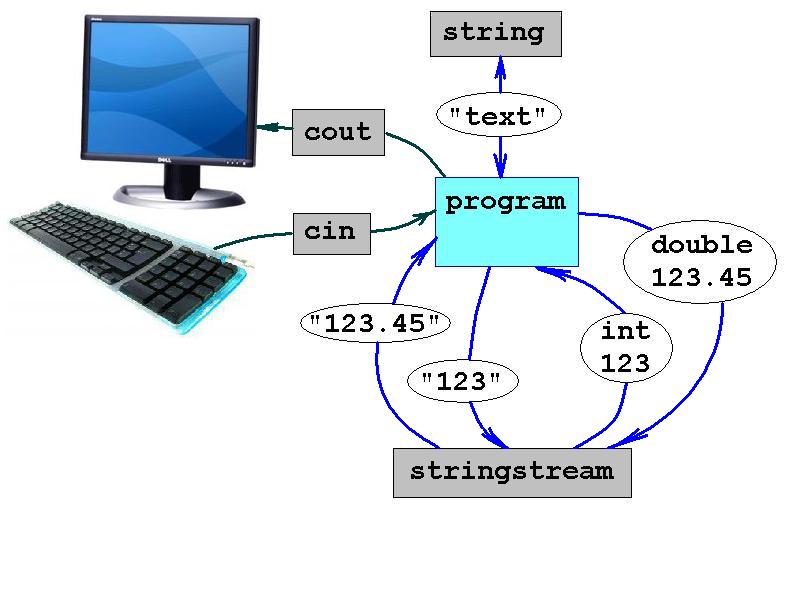
    typename           object name
    ------------       -----------
    std::ostream       std::cout; // predefined object
    std::istream       std::cin;  // predefined object
    std::string        text;      // text data
    std::stringstream  buffer;    // text buffer