Course list: http://www.c-jump.com/bcc/
On disk, data stored in sectors
Sector typically holds 512 bytes of data
Sector is the smallest unit that can be read or written
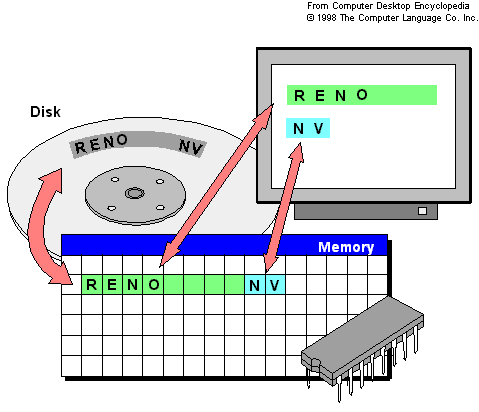
Memory is holding bytes of data
Each byte in memory can be accessed independently
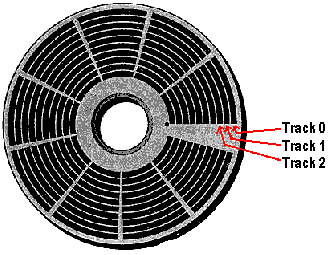
Note: Sector ize is usually 512 bytes long:
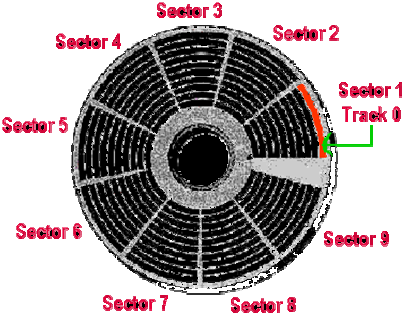
Putting it all together:
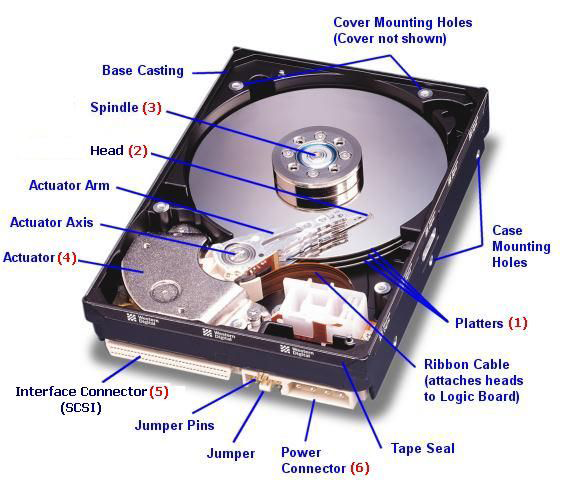
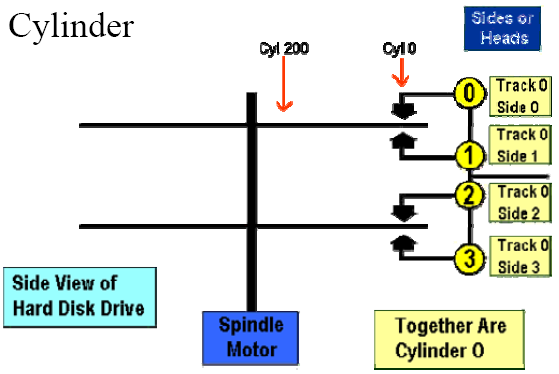
Number of cylinders (tracks), heads (sides), and sectors (aka CHS) uniquely identify the physical geometry of the storage units on a disk
CHS also yields disk capacity:
Capacity = Cylinders × Heads × Sectors × sector_size
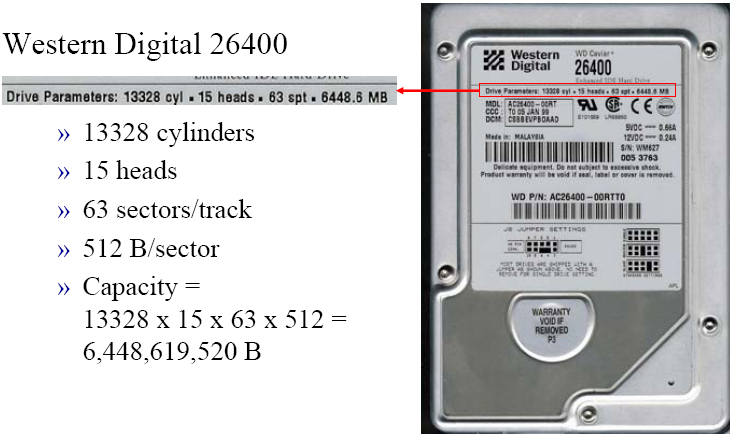
Did that drive really have 15 heads?
Could 8 platters really fit in that less than 1 inch space?
CHS = 13,328/15/63 is the reported geometry.
That is, this is what it says on the drive!
Let's see what the real geometry is...
Designed for early IDE/ATA HDDs
C <= 1,024
H <= 16
S <= 63
This mode works for drives up to 504 MB in capacity
ECHS is used for drives between 504 MB and 8 GB
CHS addressing is limited to
10 bits for cylinder (<=1024)
8 bits for head (<=256), and
6 bits for sector (<=63 since first sector is 1.)
In ECHS, the actual C value is divided by 2 and the H value multiplied by 2 until:
C < 1024 or H >= 255
Reported CHS geometry = 18,383/16/63
Capacity = 9,487,392,768 B (9 GB)
In fact, this drive might very well have two platters (i.e., 4 heads)
True geometry is CHS = 73,532/4/63
The translation is handled by the disk drive controller
On small (<=8GB) drives, every track has the same number of sectors
The outside tracks are less densely packed with bits than inside tracks
ZBR allows a variable number of sectors/track
Enabled due to sophisticated electronics built into HDD controller
Allowed manufacturers to optimize the disk surface and build higher-capacity drives
CHS values no longer represent actual geometry
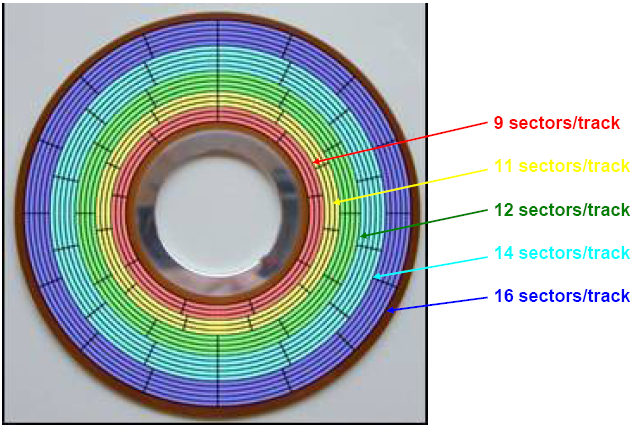
LBA is an absolute sector addressing scheme used by ZBR
First sector is 0
The hard drive controller translates LBA (physical geometry) into CHS addressing (logical geometry) used by the operating system and BIOS
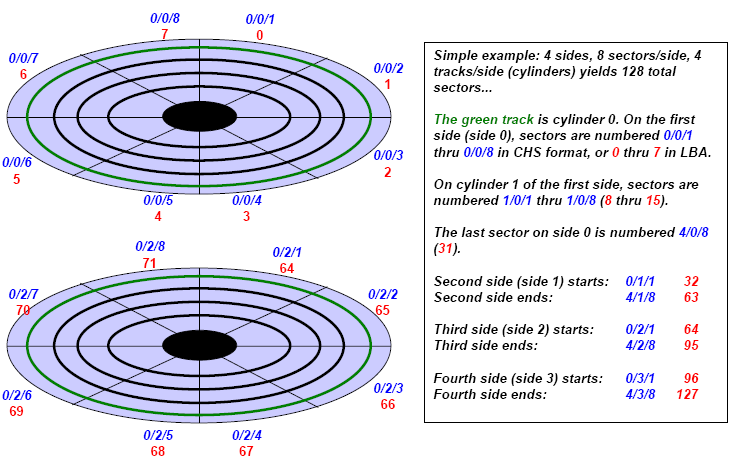
A sector is the most basic physical I/O unit on a disk
Files are linked lists on the disk; reading/writing one sector at a time would be very slow
Clusters are logical groupings of sectors by an operating system to optimize I/O
Typical hard drive cluster sizes range from 4 to 64 sectors (2-32 KB)
But they result in empty space slack at the end of a file...
...and a data hiding opportunity.
|
|
|
Parallel ATA (PATA) is an interface standard for the connection of storage devices such as hard disks, floppy drives, and optical disc drives in today's computers
ATA is AT Attachment
ATA interface itself evolved from Western Digital's original Integrated Drive Electronics (IDE) interface
ATA-3 Introduced optional security features, passwords on BIOS, see http://en.wikipedia.org/wiki/ATA-3
ATA-4 Added the Host Protected Area (HPA)
HPA=A special area of the disk that can be used to save data and a casual observer might not see it.
HPA is at the end of the disk

Tools to check for the presence of HPA:
BXDR
sandersonforensics.co.uk/BXDR.htm
DRIVEID mykeytech.com
HPA dmares.com
ATA-6 Added the Device Configuration Overlay (DCO)
A DCO can hide sectors at the end of the disk, in addition to sectors hidden by an HPA

ATA-7 Introduced the Serial ATA (SATA)
Two methods that software can use to access the disk:
Directly through the hard disk controller
Through the BIOS
Direct Access: Software communicates directly with the hard disk controller and then communicates with the hard disk.
Accessing the hard disk directly is the fastest way to get data to and from the disk, but it requires the software to know quite a bit about the hardware.
Software Access needs to know how to address the controller and how to issue commands to it.
The BIOS works as a middleman between the software and the hard disk
When the BIOS is used, there is a risk that it may return incorrect information about the disk.
If BIOS thinks it is an 8 GB, but the disk is really 12 GB, the INT 13h function provides access to only the first 8 GB.
Occasionally you hear of someone imaging a hard rive using two different tools and got different sized images.
The reason is usually because one of the tools used the BIOS and the other did not.
Make sure you know how your acquisition tool acquires the disk:
If the tool uses the BIOS make sure it reports the full disk before you acquire the disk.
The BIOS adds one more location where an error can be introduced into the final image, and it should be avoided if better alternatives exist.
The first phase of a digital investigation is the preservation of the digital crime scene.
The general procedure for acquiring a storage device is to copy one byte from the original storage device to a destination storage device and repeat the process.
The chunks of data that are transferred each time are typically a multiple of 512 bytes.
If an error is encountered while reading from the suspect drive most programs will write a zero to the destination drive.
The National Institute of Standards and Technology (NIST) has conducted tests on common acquisition tools:
The acquisition process is a two step process:
First, you need to read data from a source, and
Second the data is written to the destination source.
Live acquisition is one where the suspect operating system is still running, and
The suspect's OS will copy the data from the encrypted drives or attached flash drives
Often used in Missing person investigations
Increasingly more standard approach compared to "pull the plug" in many cases
When the computer is up and running and either unlocked or the user consents the password
Two types of the write blockers exist:
Hardware
Software
A hardware write protector is a device that sits in the connection between a computer and a storage device.
A software write blocker modifies the interrupt table so that the table entry for BIOS interrupt 13h re-points the OS address to the write blocker in memory.
When any software requests to Write Sectors To Drive, the write blocker prevents that from happening.
See also cftt.nist.gov/software_write_block.htm
Most removable media also have partitions, but they use the same structures that hard disk use.
The exception to this rule are floppy disks that are formatted for FAT12 in a Windows or Unix System.
Some thumb drives do not have partitions and contain one file system, and some of them do have partitions.
Flash cards commonly used in digital cameras, also typically have a partition table.
Many flash cards have a FAT file system and can be analyzed using normal investigation tools.
CD-ROMs are more complex because many possible variations exist.
Most CDs use the ISO 9660 format. Multiple operating systems can read the contents of the CD.
Recordable CD’s have a notion of a session. A CD-R can have one or more sessions on it.
Depending on the operating system in which the CD is used, each session may show up as though it was a partition.
Redundant Arrays of Inexpensive Disks
Main theory behind RAID is to use multiple disks instead of one for redundancy and to improve disk performance
Hardware controller or software driver is used to merge the disks together for the computer to see it as a large single volume
Raid Level 0 uses two or more disks, and the data is striped across the disk in block size chunks
Raid Level 1 uses two or more disks and mirror the data. Both disks contain the same allocated data
Raid Level 2 are rare and use error correcting codes to fix any incorrect data when it is read
In level 2 the data is striped across many disks and additional disks contain the error correcting code values
Raid Level 3 requires at least three disks and have a dedicated parity disk
The parity disk
recognizes errors in the other two disks
will be used to recreate the contents of a data disk in case if it fails
For example, if you have two values: 3 and 4, when they are added, the parity is 7.
Since it is unlikely that both data disks will fail simultaneously, either value can be recovered using known paritty.
RAID Level 4 is similar to Level 3 except the data is striped in block size chunks instead of byte sized chunks
Level 4 uses two or more disks and a dedicated parity disk
Raid Level 5 are similar to Level 4 but they remove the bottleneck associated with the parity disk
In Level 5 there is no dedicated parity disk
Level 5 is one of the more common forms of RAID and requires at least three disks
To analyze the Raid volume, it is easiest to acquire the final raid Volume as though it were a normal single disk and use the typical file system and partition analysis tools
In a software RAID, the operating system has special drivers that merge the individual disks
In windows 2000 and XP, the logical disk manager (LDM) controls the RAID volumes
The LDM requires that disks be formatted as dynamic disks, which are different from the DOS based partitions
Analysis and acquisition of software RAID is similar to a hardware RAID
Based on current technology, the easiest scenario is to acquire the RAID volume so that the normal file system tools can be used
Disk Spanning technology:
creates large storage systems; some versions support adding new disks dynamically to increase the size of the file system without a downtime or reboot
makes multiple disks appear to be one large disk
is frequently discussed with RAID because many software RAID solutions also provide disk spanning
offers no redundancy or performance benefits
Encase and ProDiscover can import the individual images from a windows logical volume and merge them together
Both cam also import the disks from a windows RAID volume and analyze them as a single volume
Many file systems have the ability to mark a data unit as damaged
This was needed with older hard disks that did not have the capability to handle errors
The operating system would detect that a data unit was bad and mark it as such so that it would not be allocated to a file
Today's modern hard disks can detect a bad sector and replace it with a spare sector, almost rendering the file system "bad sector" functionality obsolete.
Many consistency checking tools will not verify a data unit that the file systems reports as being bad
It is easy to hide data using a file system functionality, if it exists. Therefore, a user could manually add a data unit to the damaged list and add data to it
Most acquisition tools report bad sectors, so you can compare them and look inside