Course list: http://www.c-jump.com/bcc/
The heart of a modern computer is one or more Central Processing Units.
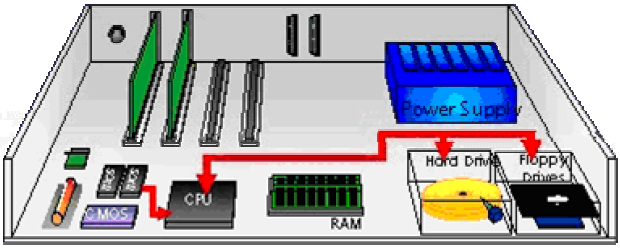
A CPU gets its instructions from memory.
The CPU reads instruction from the BIOS and searches for the hard disks, CD drives and other hardware.
The BIOS program looks at the first sector for boot code.
Devices that feed the initial CPU instructions are known as bootstrap media.
The Booting is a process involving 2 stages:
getting hardware up and running, and
getting the OS and other software up and running
Power up; computer runs POST
Boot sequence governed by BIOS ROM
BIOS parameters stored in CMOS
BIOS ROM may be password protected
Control passes to the MBR of the first bootable device detected
MBR points to boot record of selected operating system
Operating system takes control
What is a BIOS?
Basic input/output system
Built into the PC:
BIOS software stored permanently(*) on a ROM chip on the motherboard
The first code run when a PC is powered on
Identify system devices
__________________________
(*) In modern computers BIOS chip can be rewritten, allowing BIOS software to be upgraded.
What is a POST?
power-on self-test -- one of the first processes that a computer undergoes when booting
POST tests the computer to ensure that it is working as it is supposed to.
POST can detect some errors with the processor, motherboard, RAM and other memory, as well as the video card.
Most BIOS chips use a system of beep codes to indicate the POST status to the user and each BIOS chipset uses a different code.
The IBM PC BIOS code standard, for example, uses one short beep to indicate a successful POST and two short beeps to indicate a POST error while AMI BIOS uses these same beep codes to indicate a DRAM refresh failure or parity circuit failure, respectively.
What is a plug and play BIOS?
Prior to Windows 95 the BIOS was responsible for managing all hardware devices such as the floppy and hard disk drives, serial and parallel ports, video and network cards, the keyboard, and system clock.
When hardware was added to the system, the user adding the hardware had to set a variety of parameters such as the starting address in memory where the buffers and startup code could be found as well as the interrupt priority level (IRQ) of the device.
Windows 95 introduced Plug-and-Play (PnP) BIOS which automates the process of detecting and adding hardware to a system.
In addition to making it far easier for the user to add hardware devices -- PnP eliminated hardware conflicts that could cripple the PC.
The first 512 bytes on a hard drive -- aka Logical Sector Zero -- contain the Master Boot Record (MBR).
The MBR contains the boot code and the partition table.
The partition table identifies the file system on the partitions on the disk; there must be at least one.
The boot code processes the partition table to identity which partition is bootable; control then transfers to the first sector, called the boot sector, of the active partition (there can be only one). The boot sector is operating system-specific.
Once the information in the first sector is read into memory:
The Master Boot Record (MBR) contains the partition table and boot code
The boot code finds the bootable partition on this drive
The boot code transfers control to the program on the first sector of active partition
The first sector of active partition is called the OS boot sector, or Volume Boot Record (VBR)
VBR ( OS Boot sector) contain:
OS and volume file system-specific information.
For example, in the FAT file system, the boot sector information includes
the sector size,
cluster size,
number of FATs,
number of entries in the root directory,
number of sectors in the file system,
FAT size,
volume serial number,
volume label, and
file system type.
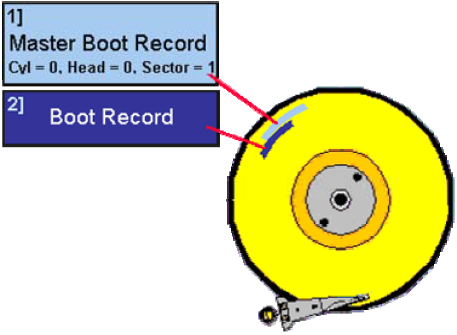
The boot code in a DOS disk exists in the first 446 bytes of the first 512 byte sector, which is the MBR.
The end of the sector contains the partition table.
Boot sector viruses insert themselves into the first 446 bytes of the MBR so that they are executed every time the computer is booted.
The master boot record is read from the first sector of the disk, and the four partition table entries are identified and processed.
In a DOS based disk the partition table and boot code requires only one sector, yet 63 are typically allocated for both the MBR and extended partitions because the partitions start on a cylinder boundary.
When parts of a partition table have become corrupt, it may be necessary to search for the extended partition tables.
To find the extended partitions, a search for 0xAA55 in the last two bytes of a sector could be conducted.
If a sector is found to be a boot sector of a file system, a partition table may exist 63 sectors prior to it.

|
|
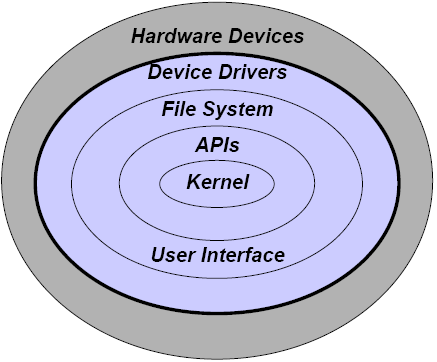
OS is software that sits between the hardware and the users; this is the user interface
The OS also provides device drivers so that the applications can communicate with the hardware
The kernel is the privileged central part of the OS
Well-known OS/user interfaces include
Command line: DOS, Unix, Linux
GUI: Windows 9x/NT/Me/2000/XP/2003/Vista, MacOS, Unix/Linux X-Windows (Gnome, KDE)
| DOS | Single-tasking operating system |
| Windows | Multi-tasking, single-user. Capable of networking and resource sharing. Used NETBEUI protocol prior to Windows 2000; largely uses TCP/IP today |
| MacOS | Multi-tasking, single-user, excels at network-based resource sharing. Used AppleTalk protocol prior to TCP/IP support; Linux-based since OS X. |
| Novell NetWare | Network operating system used for resource sharing; supports Windows and Mac clients. Dominate NOS in the 1990s using IPX protocol; Linux-based since NetWare v5 using TCP/IP. |
| Unix | Multi-tasking, single- or multi-user OS. Predominant server OS on Internet servers; has always used TCP/IP. |
| Linux | Open-source, lightweight version of UNIX; many variants. Excellent OS for resource sharing, uses TCP/IP |
A program is code or executable software sitting in a file on some storage device
Code refers to a programming language, e.g., C++, BASIC, VisualBASIC (VB), Perl, Java, ...
Executable files are binary files (DOS .exe or .com) or interpreted files (.bas, .vbs, .pl, .js, ...)
A process (or task) is a program that is currently running
Office applications
Word processing, presentation graphics, spreadsheet, database
Image, video, and sound editors
Communications software
Web browser, e-mail, instant messaging, IRC
Entertainment
Single-user and network-based games, music players, CD creation
The file system provides the framework for storing information on disks and other nonvolatile media (e.g., writeable CDs and tapes)
Provides the capability to create, modify, and delete files, examine directories, etc.
Ability to reference both the physical name and view as well as a logical name and view
Common file systems include FAT, NTFS, ufs, ext2fs, HFS/HFS+